Deep: The Powers of AI Assistants

What can in-product AI assistants do today? Real world examples from Shopify, Intercom, Retool, Stripe, Square and more....
🔒DoP Deep goes deeper into the concepts and ideas that are covered in the Weekly Briefing to help you learn lessons from the experiences of top tech companies. If you’d like to upgrade to receive these in-depth pieces of analysis you can upgrade below. New reports added every month.
When product teams first started to craft their AI product strategy, many teams jumped to the solution of adding an AI Assistant.
The capabilities of the first iteration of these AI Assistants was mixed; some performed well while others felt a little like glorified chatbots that ended up frustrating users, built as a box-ticking exercise to keep stakeholders happy.
But thanks to new agentic capabilities and other advances, the latest iteration of in-product AI Assistants are now more powerful than ever. Just this past week, Square announced a major new AI Assistant, Slack confirmed that its Slackbot would be relaunched as a new type of AI Assistant, and Shopify’s AI Assistant gained a bunch of new powers. New AI Assistants armed with agentic powers are enjoying a renaissance.
Here’s how one user recently described Shopify’s AI Sidekick Assistant:

As well as simply answering questions, Shopify’s Assistant can guide users through onboarding, generate creative assets and images, build data reports and even have audio phone conversations with users to help them troubleshoot any problems they have.
In this Deep Dive, we’ll take a closer look at the latest crop of in-product AI Assistants to understand what powers they have today and how product teams at some of the world’s leading tech companies are introducing the latest agentic technologies into their AI Assistants. For each Assistant you’ll get a summary of their capabilities along with UI examples that you can use to inspire your own product’s Assistant.
Coming up:
The exact framework that was used to build an AI Assistant that users described as “awesome” and a “game changer”
The AI Assistant that led to a 20% uplift in productivity for its users
How one tactic can transform AI Assistants into growth and retention drivers by unlocking features that were previously off limits
UI examples and new patterns from the world’s leading in-product AI Assistants that you can use to shape your own Assistant’s design
The AI Assistants and powers from companies including Stripe, Slack, Adobe, Shopify, Notion, Retool, Carta and more in full
How this Deep Dive is structured
This new analysis includes a series of different AI Assistants from leading tech companies including Intercom, Stripe, Retool, Adobe and others, with UI examples included for each assistant.
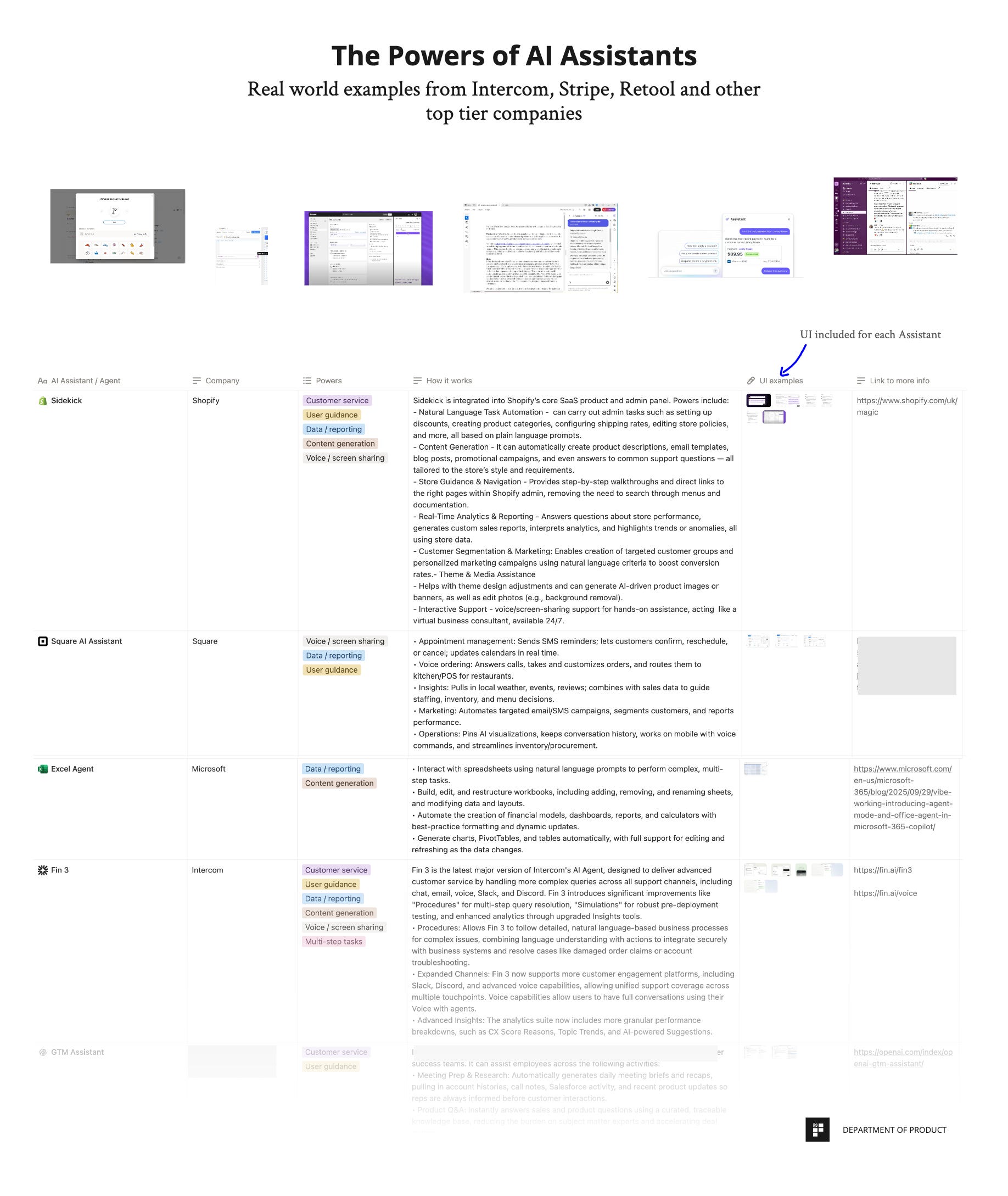
Each Assistant example is structured to include the following:
AI Assistant / Agent - some companies simply refer to their assistant as an assistant but many companies also give their assistants unique names. Docusign Iris, Zoom’s AI Companion, Qualtrics Assist are all examples of where companies give their AI Assistants unique names to help bring them to life. Since the lines between assistants and agents are blurring because many assistants now also have agentic capabilities, examples of in-product agents are also included.
Company - this deep dive is specifically focused on companies with in-product AI Assistants rather than all-purpose assistants or agents like ChatGPT.
Powers - each AI Assistant has its own powers that are designed to help users of that product. Each power is categorised according to the tasks it performs and how it helps users. More on that below.
How it works - as well as the power overviews, detailed explanations of these powers and features are included for each example.
UI examples - every AI Assistant comes with downloadable UI examples that you can use to help shape your own product’s AI Assistant and understand how some of the powers are actually delivered to users.
Link to more information - links to official resources to learn more about the AI Assistant and how it works.
The AI Assistant Powers explained
Sure, the word “powers” does sound a little juvenile but for everyday users to interact with these Assistants, when they work, it can often feel quite magical. Almost 70% of the companies featured use the word “power” or “magic” on their website to describe their AI Assistant and so this felt like a natural way to describe it.
Here’s an overview of the categories of powers included:
Customer service - traditionally, AI Assistants have been used to help users solve problems and resolve customer support issues. This is still true and many of the AI Assistants still do this.
User guidance - AI Assistants can not only solve customer service issues but can also help users onboard and navigate throughout products, too. The user guidance power is used to describe examples of this where the Assistant can proactively help users solve problems that relate to the product.
Data / reporting - Square recently added this capability to their Dashboard Assistant and more Assistants are doing the same. Data analytics and reporting is a core feature of many in-product Assistants now. Get real world examples of companies who offer this.
Content generation - Assistants can do more than just assist - they can now create artifacts that are useful to users in-product. This includes writing code that can be used for SQL queries in reporting apps, generating images for ecommerce, building cash reconciliation spreadsheets and generating ideas for new videos in YouTube.
Summarization - summarizing content within the product to help users boost productivity. Docusign’s Iris Assistant for example, will summarize the key parts of a contract and flag any issues that may be contentious before signing.
Voice / screen sharing - thanks to new voice / audio models, it’s now possible for users to have voice conversations with AI Assistants. This can be particularly helpful for troubleshooting issues. Companies like Square and Intercom now offer this.
Multi-step tasks - agentic workflows are increasingly being embedded inside AI Assistants to help users complete complex actions. Stripe’s new Dashboard Assistant, for example, can chain multiple steps together to perform actions like finding a product and generating a payment link for it.
A deeper look at the AI Assistants and their powers from some of the world’s leading companies
Now let’s take a closer look at some of the most powerful in-product AI Assistants.
We’ll start with an Assistant that recently gained a bunch of new powers which their own users described as “awesome” and a “game changer” during their user testing.