What are Claude Skills and how can you use them for product-related work?
🧠 “Maybe bigger than MCP”. Build product metric spreadsheets, automate your product development cycle and more. Knowledge Series #89...
🔒The Knowledge Series is available for paid subscribers. Get full ongoing access to 80+ technical explainers and AI guides and tutorials to grow your AI and tech knowledge at work. New guides are added every month.
It’s been less than a week since the release of Claude’s latest feature, Skills, and the hype train is in full swing.
In the past week, Anthropic’s product lead Brad Abrams told The Verge that he’s using it to create presentations to track market sentiment about the company’s new features, Notion’s product manager MJ Felix says that the feature “works seamlessly” for achieving more predictable results and Simon Willison says that Claude Skills have the potential to be “bigger than MCP”.
Claude Skills are both simple and complex.
They’re simple in the sense that they’re just markdown files and scripts added to agentic workflows, but complex in the sense that they can help AI agents achieve impressive multi‑step tasks.
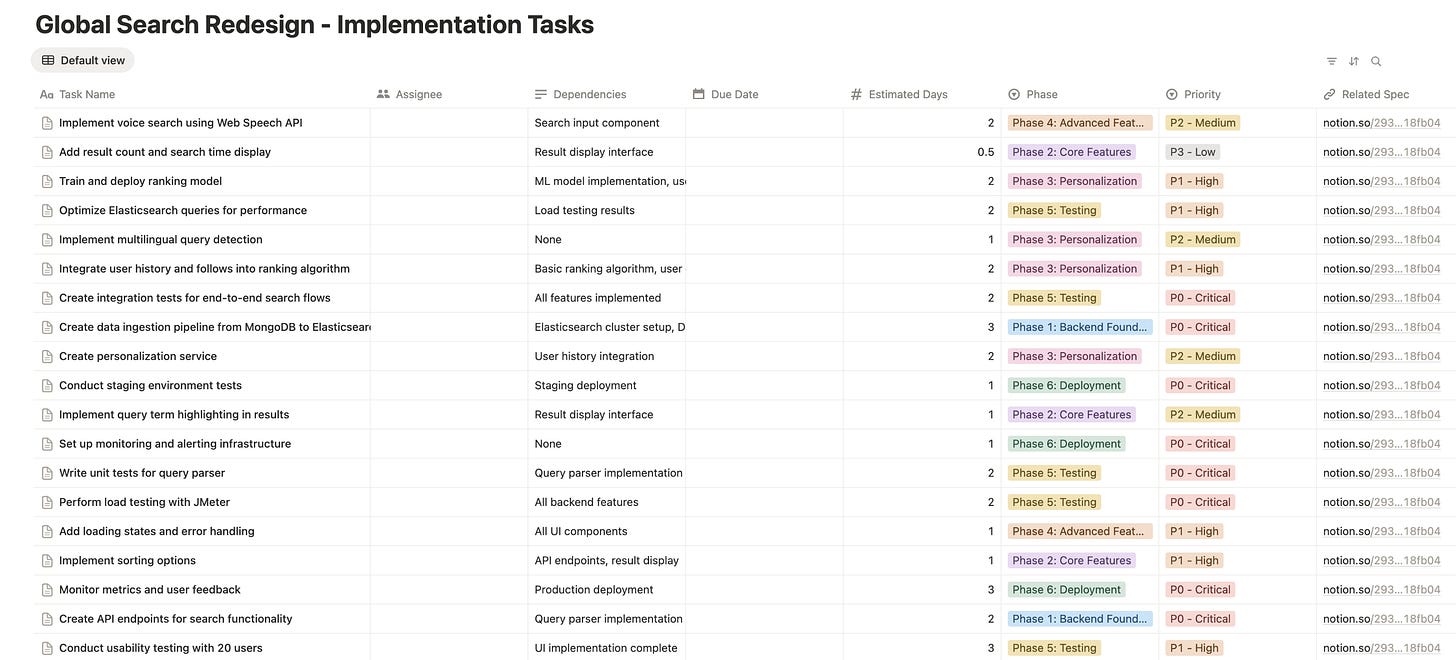
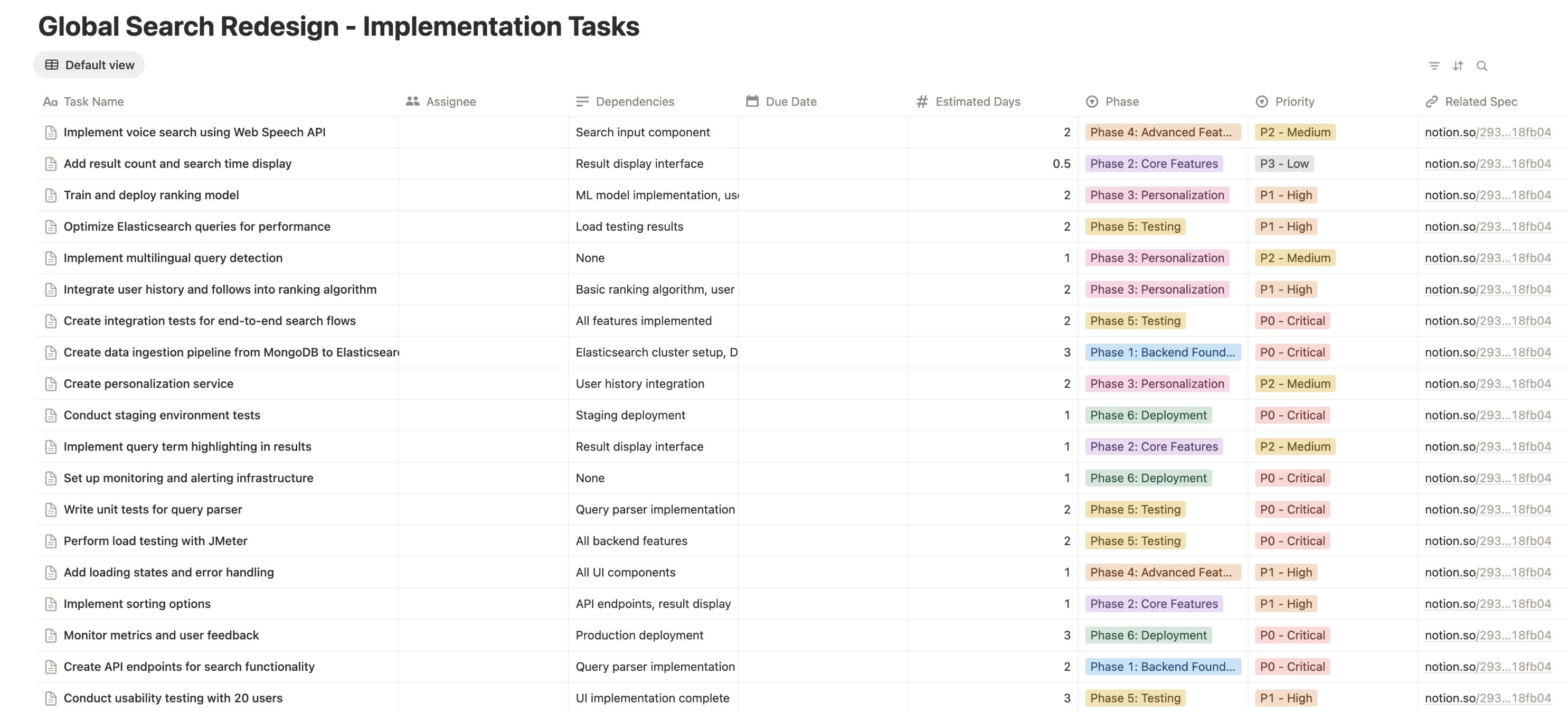
One Claude Skill was able to build this entire backlog of 42 user stories complete with acceptance criteria, detailed requirements and development tasks from a single PRD in just 10 minutes:
In this Knowledge Series, we’re going to take a look at the technologies behind Claude Skills to understand how they work. We’ll dig into the anatomy of a Claude Skill, why they’ve been built in the way they have and perhaps most importantly - what exactly you can do with these new Skills.
Coming up:
What are Claude Skills? The technologies behind Skills explained simply for product teams
The anatomy of a Skill unpacked
How to use Claude Skills at work - a step by step guide for using Skills for:
Creating presentations that match your company’s branding
Building an Excel spreadsheet that tracks your product’s key metrics
Automating the end to end product development process by turning specs into concrete tasks that Claude Code can implement automatically
How to build your own Skills from scratch

What are Claude Skills and how do they work?
In simple terms, Claude Skills are just folders that contain information that Claude can load whenever it thinks they might be relevant.
Skills tell Claude how to complete a task, such as generating a report, a presentation or a coding task in a repeatable way that is customized to your own company’s needs. As Anthropic’s product lead put it, these Skills are a way to teach agents to do a good job “in their specific context”.
When you give Claude a task, it scans your available Skills and activates the right one. Crucially, it only loads the files needed at that moment to stay efficient (more on that later).
Skills work across the Claude web app, Claude Code, and the API, and can even combine (“stack”) to perform complex tasks without overloading context. Anthropic says that “Building a skill for an agent is like putting together an onboarding guide for a new hire”.
Here’s a high level snapshot of how these Skills work and fit into the bigger picture of AI Agent architecture:
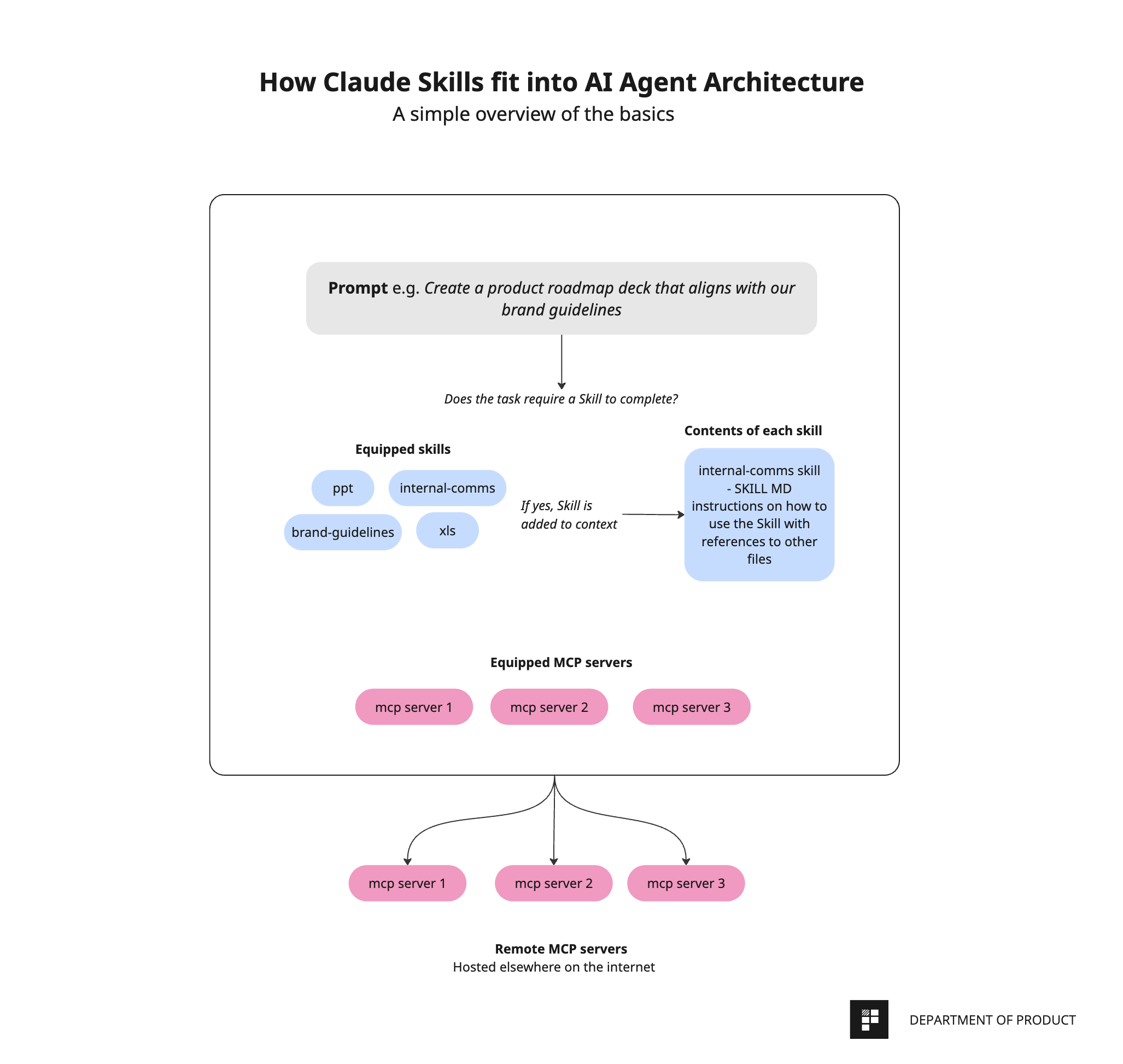
The Agent is configured to be equipped with a bunch of different Skills that it can use as and when it deems necessary through its own virtual computer. These Skills are stored in their own directories.
Claude will only use the Skill if it thinks using the Skill will be relevant for completing its task. This makes the process super efficient.
A step by step breakdown of how Skills work
The process kicks off with the user prompting Claude. Depending on the nature of the prompt, Claude assesses the user’s prompt against its pre-installed Skills and decides if a specific Skill (e.g., “PDF converter”) is helpful to complete the task.
If Claude decides a Skill is helpful, it adds the Skill to the context window for the current task. If the Skill also comes with other executable tools (e.g., a Python script to parse PDF form fields), Claude can run these directly too. The guidance from the Skill and any linked files plus outputs from any executed scripts are then incorporated into Claude’s working plan and context for the session.
With the relevant Skill instructions and any tool outputs available, Claude continues the conversation or performs the requested action (e.g., filling a PDF form), now specialized by the skill.
The difference between Skills and MCP
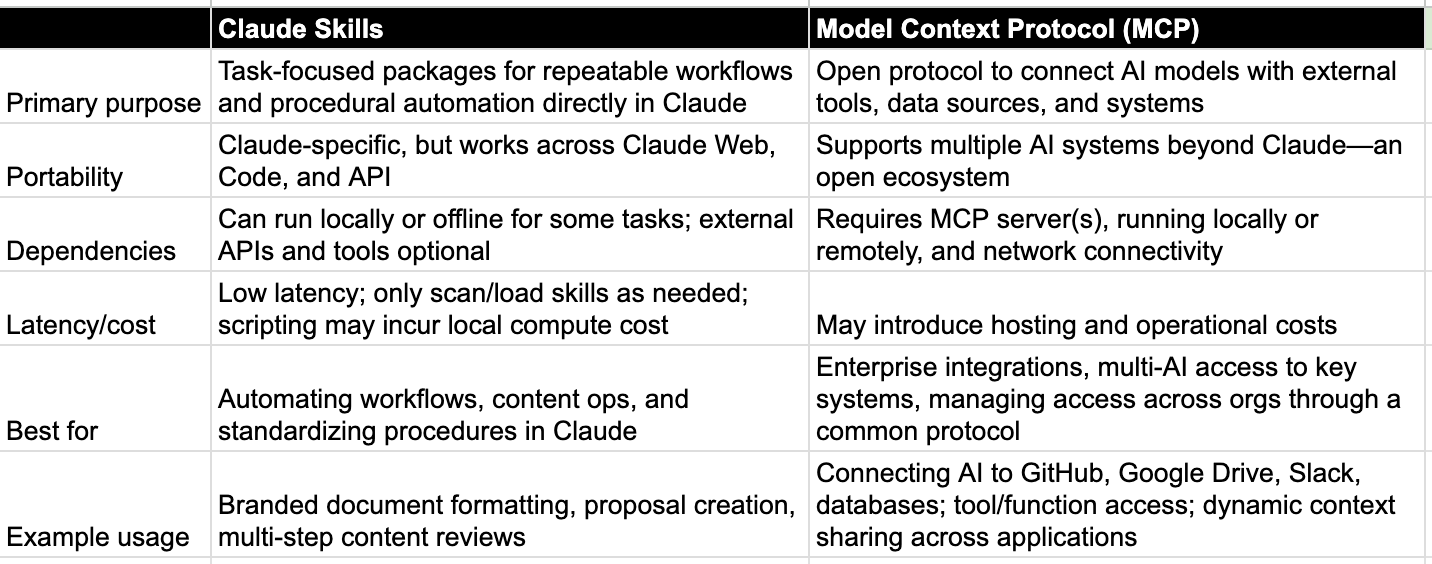
Skills are separate to MCP servers and the two can be used alongside each other. Whereas MCP is an open protocol designed to connect AI models with external tools and data sources, Skills are task-focused packages for repeatable workflows designed to be used directly inside Claude.
Here’s the key differences between Claude Skills and MCP:
The anatomy of a Claude Skill
That’s a high level overview of how these Skills work, but before we look at some real world, practical examples of how you might be able to use these Skills, let’s dig a little deeper into the anatomy of a Skill.
As we’ve said, a Skill is a folder or directory with a bunch of files in. But perhaps the most important file is the SKILL.md file.
This is a simple markdown file that’s specifically designed to give Claude both just enough information to decide whether the Skill is relevant for the task at hand - and also more detailed instructions if indeed it is.
There are essentially 3 components or layers of a SKILL.md file, each with their own role:
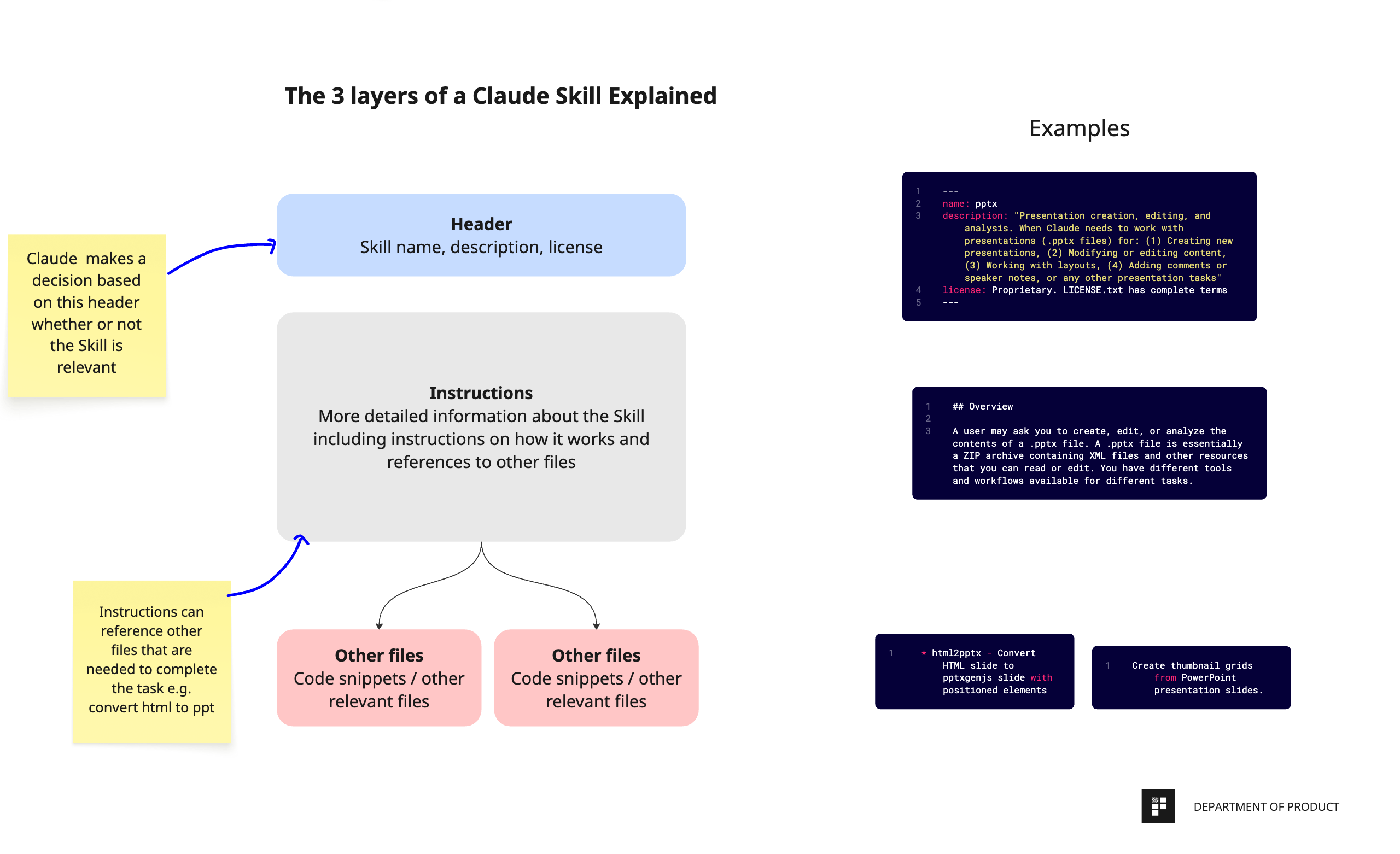
The header description
First is a simple header description that explains what the Skill is designed to be used for. This is known as the “YAML Frontmatter”. YAML is just a plain text format designed to be easy to read and write to. YAML files are widely used for configurations in DevOps for things like managing release pipelines and other things.
In the context of Skills, the most important takeaway here is that these files are designed to be super light weight summaries of what the Skill does so that Claude can decide whether or not to use the Skill for a task it’s working on. This is referred to as progressive disclosure and it’s an architectural design that is baked directly into Skills that makes them less resource intensive and more token efficient.
The body of the Skill
The next layer is the actual body of the Skill. This is where most of the instructions on how to use the Skill is stored.
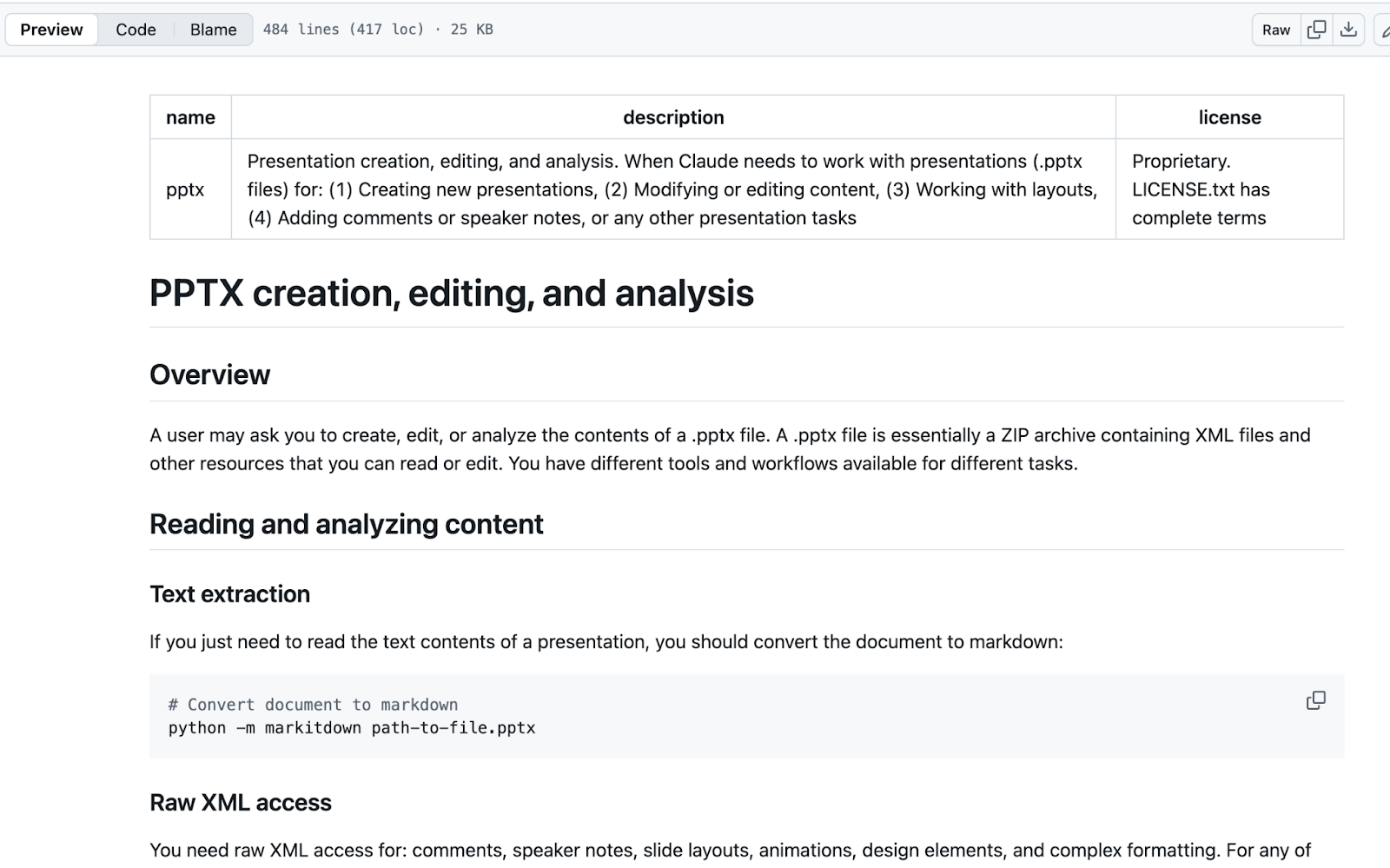
Here’s an example of a markdown file from Anthropic for its Powerpoint Skill.
As you can see, this file contains a whole bunch of detailed information about the Skill what it’s for, when to use it, and step‑by‑step workflows. It includes details about text extraction, typography/color analysis from theme and slide XML, and three creation paths: from scratch using html2pptx, editing existing decks via OOXML scripts, and building new decks from a template with inventory, outline, rearrange, and replace steps.
This file is the crux of the Skill since it contains most of the details and instructions on how Claude should complete its task with this Skill in mind. This file also contains information about the third and final layer of a Skill, too - the file references.
File references
In the case where a Skill needs to rely on code snippets or other assets / instructions, these are not all included in the same file. Instead, these files are created separately and referenced to ensure that Claude only uses them when they’re needed.
This is progressive disclosure in action again - ensuring that Claude doesn’t waste resources and only refers to files and processes when it needs to. An elegant way of ensuring the agent’s context window isn’t overloaded.
A closer look at an example
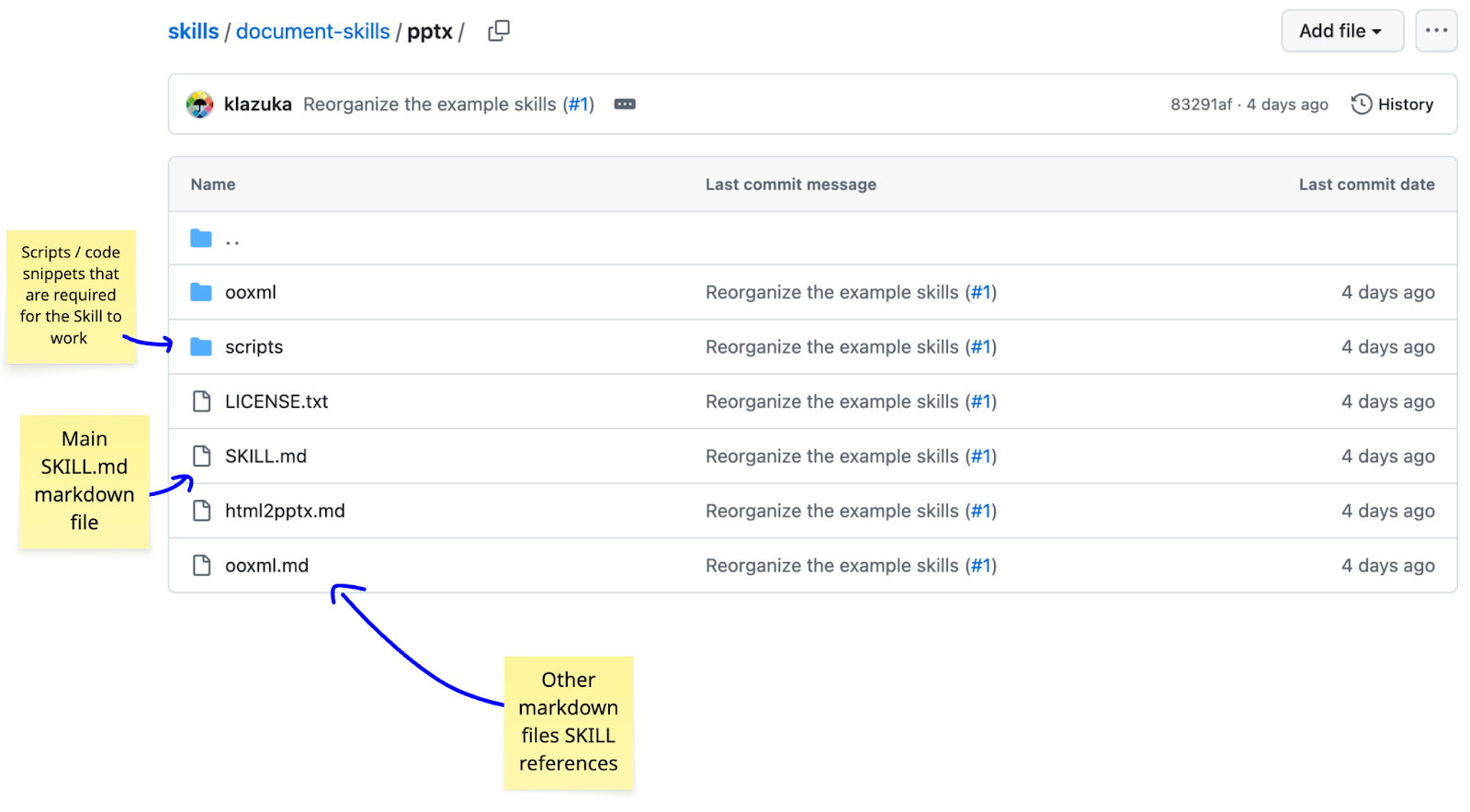
Anthropic has published a series of Skills on its GitHub repo and if we take a look at an example, you can clearly see the structure of a Skill.
Here’s the structure of the ppt Skill folder which includes the SKILL.md file, other markdown files and scripts that are needed for the Skill to run properly.
The SKILL.md file includes more information in the format we outlined earlier with the header outlining the name of the Skill, along with description, followed by more detailed instructions and information on how Claude should use the Skill:
Practical ways product teams can use Claude Skills
OK, so now that we’ve got a solid understanding of some of the core principles, let’s take a look at some of the practical ways you might be able to use these Claude Skills at work.
We’ll look at 3 distinct, practical examples together:
Creating an in-depth product metrics spreadsheet for tracking LTV, CAC, churn, revenue and more
Using a brand Skill to transform data into a 10 page strategy deck that automatically uses your own company’s brand guidelines
Using a spec to implementation Skill to automate feature development from specs through to production